<?xml version="1.0" encoding="utf-8"?><feed xmlns="http://www.w3.org/2005/Atom" ><generator uri="https://jekyllrb.com/" version="3.10.0">Jekyll</generator><link href="https://batistayureiba.github.io//feed.xml" rel="self" type="application/atom+xml" /><link href="https://batistayureiba.github.io//" rel="alternate" type="text/html" /><updated>2026-02-27T00:05:51+00:00</updated><id>https://batistayureiba.github.io//feed.xml</id><title type="html">Yureiba Batista</title><subtitle>Portafolio: Yureiba Batista</subtitle><entry><title type="html">Resumen</title><link href="https://batistayureiba.github.io//post/about" rel="alternate" type="text/html" title="Resumen" /><published>2025-05-24T00:00:00+00:00</published><updated>2025-05-24T00:00:00+00:00</updated><id>https://batistayureiba.github.io//post/about</id><content type="html" xml:base="https://batistayureiba.github.io//post/about"><![CDATA[<h6 id="especialista-en-operaciones-y-bases-de-datos-en-transición-estratégica-a-ingeniería-de-datos-dataops">Especialista en Operaciones y Bases de Datos (En Transición Estratégica a Ingeniería de Datos (DataOps)).</h6>
<hr />

<p>👋 Hola, mi nombre es <strong>Yureiba Batista.</strong> Poseo una base sólida en Ingeniería de Operaciones y Administración de Bases de Datos, donde aprendí la disciplina esencial de mantener la <strong>Integridad, Disponibilidad y Rendimiento</strong> en sistemas críticos.</p>

<p>Actualmente, estoy <strong>pivotando mi carrera hacia la Ingeniería y Analítica de Datos.</strong> Mi enfoque es combinar esa solidez operativa con un stack de herramientas modernas para transformar datos en valor. Estoy reforzando activamente mis capacidades a través de la certificación <strong>IBM Data Engineering</strong> y la especialización en <strong>Power BI</strong>.</p>

<p>Mi background ya me equipa para entender y gestionar el <strong>ciclo de vida de los datos</strong>, desde la extracción y el almacenamiento <strong>(DWH)</strong> hasta la visualización, utilizando herramientas como <strong>Python (Data Science), Airflow y Shell Scripting</strong>.</p>

<p>En mi experiencia, he actuado como recurso clave para la <strong>continuidad del servicio</strong> en entornos de <strong>alto volumen transaccional</strong> (como venta y finanzas), y he colaborado con equipos multidisciplinarios. Esto me permite ir más allá del troubleshooting reactivo y dirigir mis esfuerzos a la <strong>mejora continua</strong> y la <strong>automatización de procesos</strong>. Es precisamente esta mentalidad de eficiencia la que me ha llevado a la Ingeniería de Datos.</p>

<p>Mi metodología es práctica y consiste en identificar los desafíos operativos y aplicar soluciones de scripting y automatización. He desarrollado y prototipado flujos ETL/ELT eficientes usando Python, Apache Airflow y Bash, garantizando que los datos sean siempre confiables, accesibles y ágiles. <a href="../assets/download/e.sql">Ir a Proyectos</a></p>

<p>✅ <strong>Como puedo ayudarte:</strong></p>

<ul>
  <li>💡 Puedo traducir eficazmente los requerimientos empresariales en <strong>soluciones de negocio de alto valor y funcionales</strong></li>
  <li>🔗 Puedo diseñar y construir pipelines ETL/ELT automatizados y eficientes para garantizar un flujo de información constante y escalable.</li>
  <li>🔒 Puedo asegurar la calidad y fiabilidad del dato, aplicando mi base operativa para minimizar errores y proteger la integridad de la información en todo el sistema.</li>
  <li>⚡ Puedo optimizar consultas y procesos de bases de datos para incrementar la velocidad y el rendimiento del core tecnológico.</li>
  <li>📊 Puedo construir reportes e indicadores clave (Dashboards en Power BI) que transforman los datos sin procesar en insights accionables para la toma de decisiones stratégicas.</li>
</ul>

<p><br />
🤝 Conectemos</p>

<p>Si tu equipo valora la fiabilidad operativa y busca un talento con la energía y la base técnica para construir soluciones de datos robustas y automatizadas:
 Conversemos sobre cómo mi experiencia en Operaciones y mi potencial en Data Engineering pueden aportar al éxito de tu producto.
 Escribe a mi dirección 👉 <strong>batistayureiba@gmail.com</strong></p>

<p>:
Busco un rol Junior o de Analista que me permita aplicar esta combinación única de solidez operativa comprobada y conocimiento de vanguardia para generar valor inmediato en la optimización de procesos y el desarrollo de pipelines. <a href="../assets/download/electromarket.sql">Revisa algunas inicitivas aquí</a></p>]]></content><author><name></name></author><summary type="html"><![CDATA[Especialista en Operaciones y Bases de Datos (En Transición Estratégica a Ingeniería de Datos (DataOps)).]]></summary></entry><entry><title type="html">Jekyll Garden Features</title><link href="https://batistayureiba.github.io//post/features" rel="alternate" type="text/html" title="Jekyll Garden Features" /><published>2020-03-01T00:00:00+00:00</published><updated>2020-03-01T00:00:00+00:00</updated><id>https://batistayureiba.github.io//post/features</id><content type="html" xml:base="https://batistayureiba.github.io//post/features"><![CDATA[<h6 id="wiki-links-are-auto-converted-to-hyperlinks">Wiki links are auto-converted to Hyperlinks</h6>
<p>The theme will automatically convert wiki links to inline links. Similarly, <code class="language-plaintext highlighter-rouge">[text](url)</code> will be converted to external links.</p>

<h6 id="markdown-support">Markdown support</h6>
<p>The theme supports all standard markdowns. Have a look at [[Markdown Rendered]] to see preview.</p>

<h6 id="external-links-are-indicated">External Links are indicated</h6>
<p>With link icon next to external links, it's easier to identify internal links and external links</p>

<h6 id="easy-front-matter">Easy Front-Matter</h6>
<p>Using frontmatter, it's easy to configure notes. The capability includes - feed order based on date, option to hide notes from feed, list layout and more.</p>

<h6 id="introducing-list-layout-for-notes">Introducing List layout for Notes</h6>
<p>With simple front matter configuration, you can build a list layout (Check [[Credits]] for demo). This is helpful for building manual MoC :)</p>

<h6 id="static-homepage">Static Homepage</h6>
<p>Want to have a seperate home page instead of the feed? (Like <a href="https://hiran.in/">my personal website</a>) - You can configure that at <code class="language-plaintext highlighter-rouge">_config.yml</code> by change homepage enabled to true.</p>

<h6 id="support-subpath">Support Subpath</h6>
<p>You can install Jekyll garden to a URL path, or a sub path (example.com/digitalgarden). To do that, just configure baseurl at  <code class="language-plaintext highlighter-rouge">_config.yml</code></p>

<h6 id="private-files-using-gitignore">Private files using .gitignore</h6>
<p>Not a theme feature, but if you want to publish part of your obsidian, it's easy. Just create two folders inside <code class="language-plaintext highlighter-rouge">_notes</code> (Say Public and Private), and use Gitignore to stop syncing your pirvate files with Github!</p>]]></content><author><name></name></author><summary type="html"><![CDATA[Wiki links are auto-converted to Hyperlinks The theme will automatically convert wiki links to inline links. Similarly, [text](url) will be converted to external links.]]></summary></entry><entry><title type="html">acercade</title><link href="https://batistayureiba.github.io//post/how-to" rel="alternate" type="text/html" title="acercade" /><published>2020-03-01T00:00:00+00:00</published><updated>2020-03-01T00:00:00+00:00</updated><id>https://batistayureiba.github.io//post/how-to</id><content type="html" xml:base="https://batistayureiba.github.io//post/how-to"><![CDATA[<p>Jekyll garden is a theme over Jekyll that supports Obsidian formats, and few features. To install Jekyll to your server or local host, refer <a href="https://jekyllrb.com/docs/installation/">these documents</a>. <a href="https://github.com/Jekyll-Garden/jekyll-garden.github.io/blob/main/Dockerfile">Docker file</a> is also available.</p>

<p>Alternatively, you can use <a href="https://github.com/">Github</a> and <a href="https://pages.github.com/">Github Pages</a> as your server. It's very simple and almost low-code. Here is how to do it.</p>

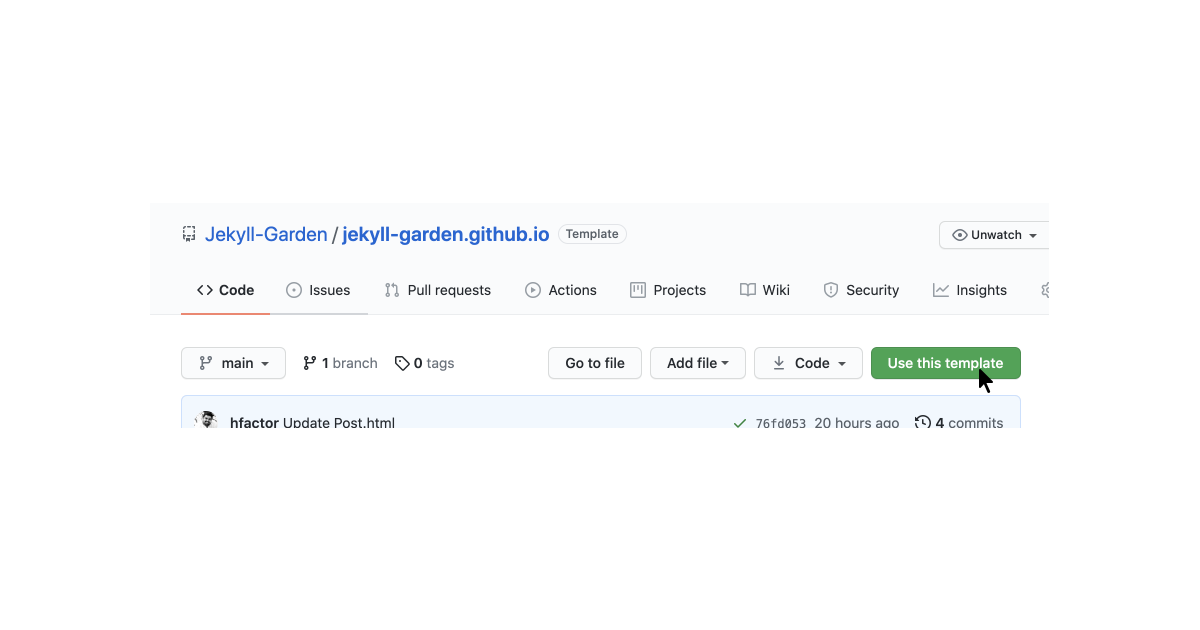
<p><strong>Step 1</strong>: Sign-In to Github, visit the <a href="https://github.com/Jekyll-Garden/jekyll-garden.github.io">theme page</a> and click on 'Use this Template'</p>

<p><img src="../assets/img/1-how-to.png" width="100%" /></p>

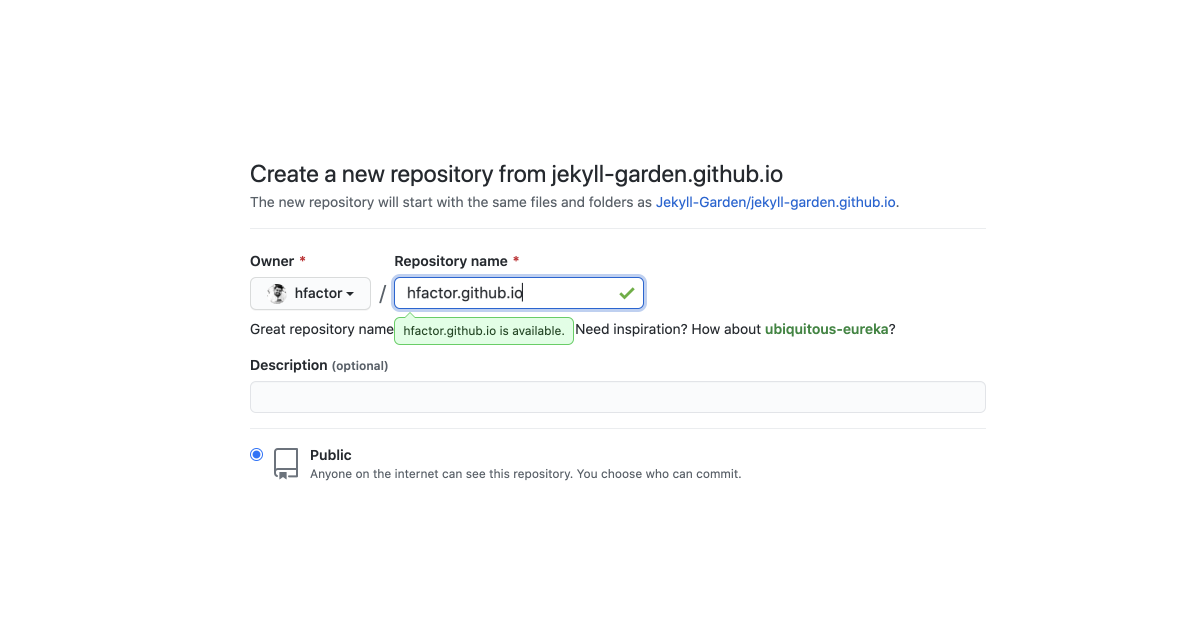
<p><strong>Step 2</strong>: Name the forked repo as <code class="language-plaintext highlighter-rouge">yourusername.github.io</code>. My Github username is hfactor, hence it's hfactor.github.io</p>

<p><img src="../assets/img/2-how-to.png" width="100%" /></p>

<p><strong>Step 3</strong>: Go to your repo's settings &gt; pages and set the source to your main branch. 
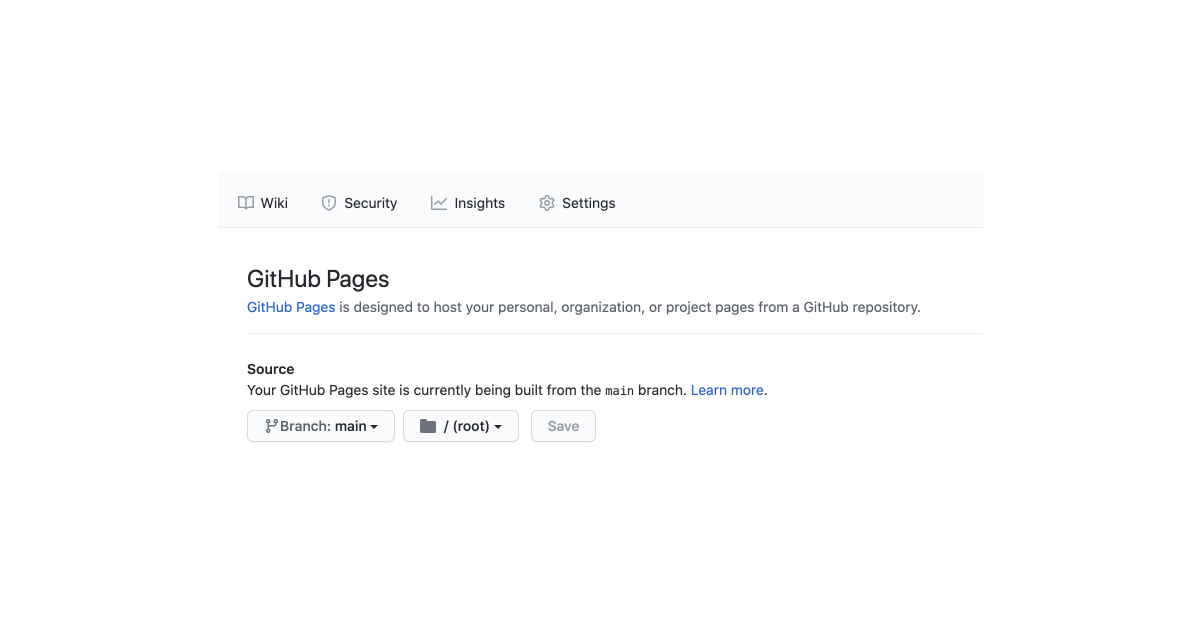
<img src="../assets/img/3-how-to.png" width="100%" /></p>

<p><strong>Step 4 (Optional)</strong>: If you have a custom domain, set <a href="https://docs.github.com/en/pages/getting-started-with-github-pages/securing-your-github-pages-site-with-https">CNAME</a>.</p>

<h2 id="configuring-your-jekyll">Configuring Your Jekyll.</h2>

<p>Now you have Jekyll setup ready, go to <code class="language-plaintext highlighter-rouge">_config.yml</code> and set your configurations. Here you can do the following configurations :</p>
<ol>
  <li>URL to set your hostname</li>
  <li>BASEURL to set your sub path (url/subpath/)</li>
  <li>Website Heading, Content, Copyright Year + Message</li>
  <li>Private Link - On hover message</li>
  <li>What all folders to exclude (Obsidian Template and all)</li>
</ol>

<p>Edit these value via Github, and commit directly to Github, which will refresh the whole setup, and a Jekyll enivorment will be ready. You can visit the page by visiting  <code class="language-plaintext highlighter-rouge">yourusername.github.io</code></p>

<h2 id="syncing-github-with-obsidian">Syncing Github with Obsidian</h2>

<p>Now you have your online publishing setup ready. It's time to build your local knowledge management using Obsidian. Here are the steps :</p>

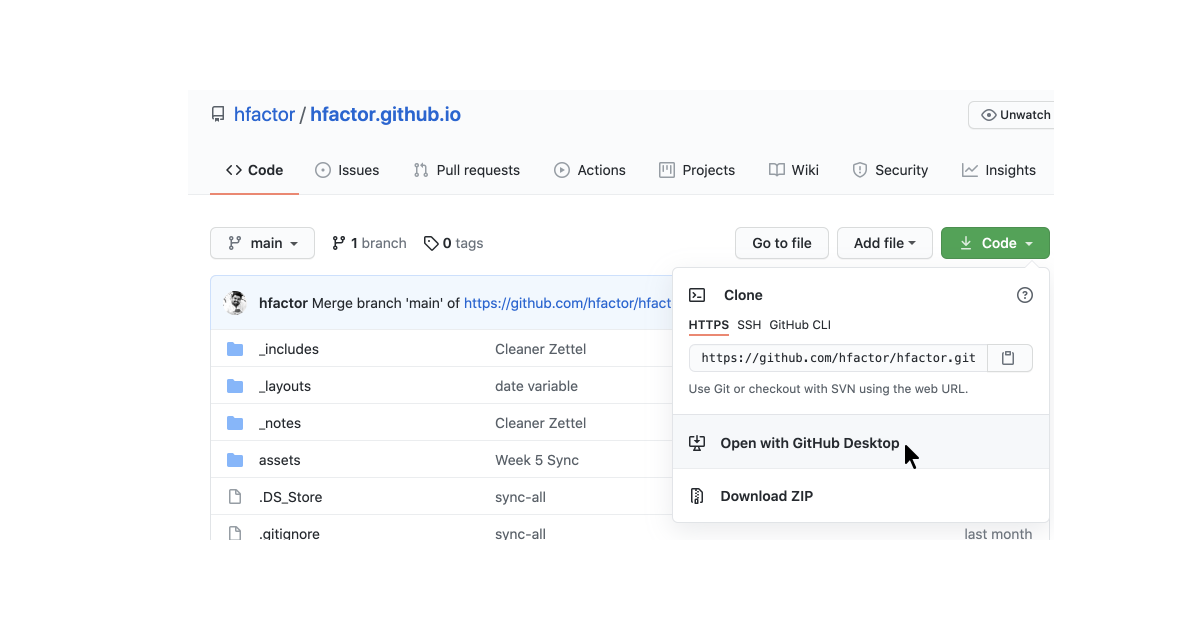
<p>Step 1: Go to github and clone your repository to your machine. For this, you can use git-commands or install <a href="https://desktop.github.com/">Github for desktop.</a> 
<img src="../assets/img/4-how-to.png" width="100%" /></p>

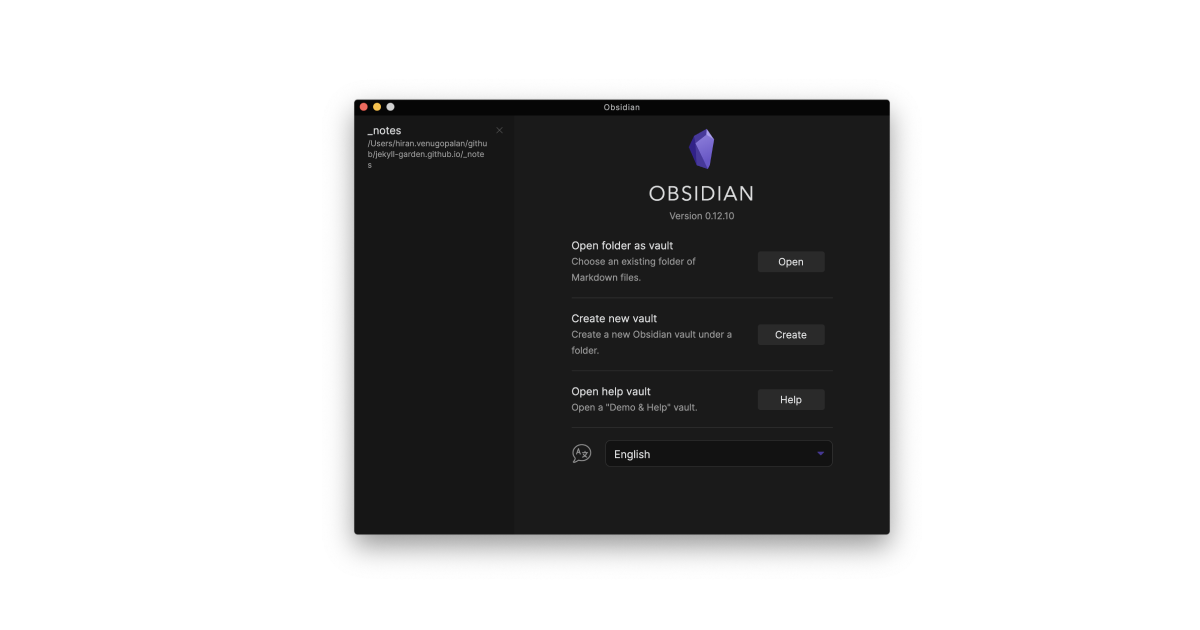
<p>Step 2: Once you have successfully cloned the repository to your machine, Open the Obsidian app in your machine, and set the folder <code class="language-plaintext highlighter-rouge">_notes</code> inside the repository as your vault. 
<img src="../assets/img/5-how-to.png" width="100%" /></p>

<p>This is important, because Jekyll Garden can only fetch and publish notes from <code class="language-plaintext highlighter-rouge">_notes</code> folder.</p>

<h2 id="frontmatter">Frontmatter</h2>

<p>For all notes to work properly, we need to have three frontmatter values.  Please make sure the front matter is written in between three lines. If you check any .md files in this repo, you will see something this.</p>

<div class="language-plaintext highlighter-rouge"><div class="highlight"><pre class="highlight"><code>---

title: Credits
feed: hide
date: 11-05-2022
permalink: /credits
format: list

---
</code></pre></div></div>

<ol>
  <li><code class="language-plaintext highlighter-rouge">Title</code> is the page title. It <strong>should be same as that of your Obsidian file</strong> title for our Wiki links to work. i.e, if file is <code class="language-plaintext highlighter-rouge">credits.md</code> title has to be <code class="language-plaintext highlighter-rouge">credits</code></li>
  <li>If you want to show the note on the feed, you should set <code class="language-plaintext highlighter-rouge">Feed</code> as <code class="language-plaintext highlighter-rouge">show</code>. It's an optional value, and the default value is set to hide. (To avoid publishing by mistake)</li>
  <li><code class="language-plaintext highlighter-rouge">date</code> is used to sort note in feed.</li>
  <li><code class="language-plaintext highlighter-rouge">permalink</code> is an optional value. Use it to set permanent URLs</li>
  <li><code class="language-plaintext highlighter-rouge">format:list</code> will change the layout to a list with border, Refer [[Credits]]. This is useful for Curated lists (Check <a href="https://hiran.in/list/reading">my personal library</a> ) or while building MoC.</li>
</ol>

<h2 id="updating-digital-garden">Updating Digital Garden</h2>

<p>Once you have enough notes, got to the Github Desktop app, commit the changes to main, and push the changes to Github. Github will update the pages!
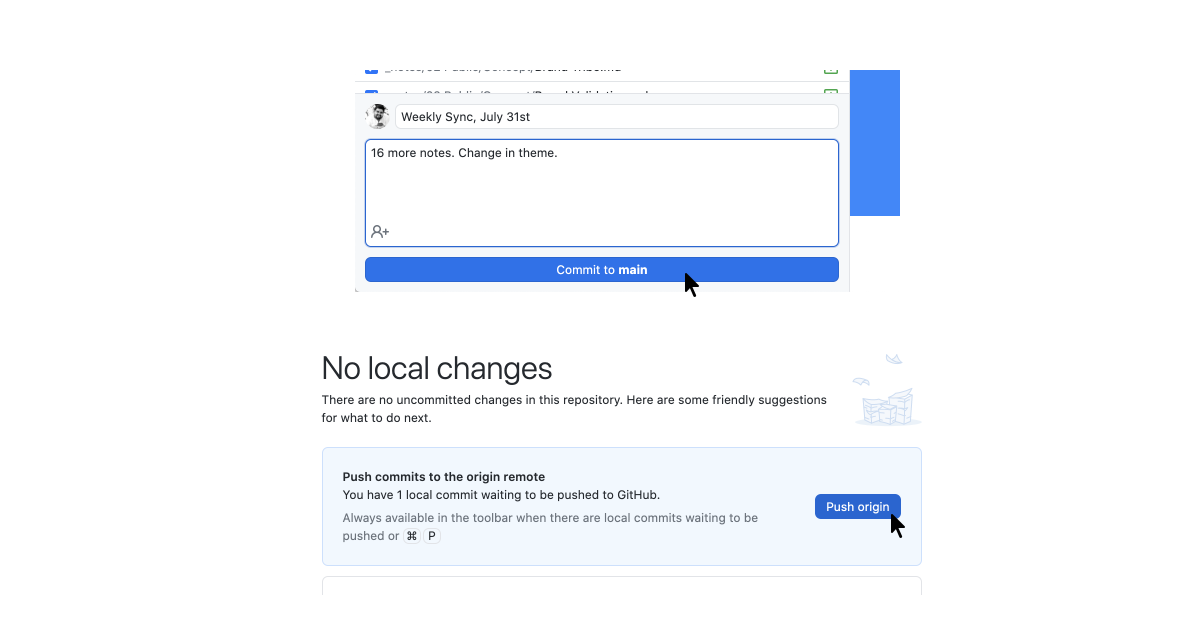
<img src="../assets/img/7-how-to.png" width="100%" /></p>

<p>If you want to know my workflow or Obsidian folder structure, check <a href="">here</a></p>

<h2 id="features">Features</h2>
<ul>
  <li>Check <a href="../post/features">Features</a> to know theme features</li>
</ul>

<h2 id="credits">Credits</h2>
<ul>
  <li>Check [[Credits]]</li>
</ul>]]></content><author><name></name></author><summary type="html"><![CDATA[Jekyll garden is a theme over Jekyll that supports Obsidian formats, and few features. To install Jekyll to your server or local host, refer these documents. Docker file is also available.]]></summary></entry></feed>